
Quick verdict (Raycast review summary): Raycast is the most powerful keyboard launcher available for macOS. The free tier alone destroys Spotlight, and the Pro tier, with full AI integration, is a genuine productivity multiplier for developers, founders, and power users.
RAYCAST QUICK SUMMARY ⭐ Rating: 4.8/5 | 💰 Price: Free / $8/month Pro (~₹670/month) | 🖥️ Platform: macOS (Windows beta) 🎯 Best for: Developers, founders, Mac power users | 🔑 Standout: AI + extensions in one launcher Try Raycast Free →
Introduction
This Raycast review covers everything you need to decide if it’s worth switching from Spotlight: features, AI capabilities, pricing in 2026, and how it stacks up against Alfred and LaunchBar. If you’re a developer or freelancer on Mac, this is the keyboard launcher you’ve been waiting for.
I’ve been using Raycast daily for over eight months across client projects from managing GitHub PRs for a Next.js SaaS build to drafting Notion docs via AI commands. The productivity gain is real and measurable: I’ve cut app-switching time by an estimated 30–40 minutes per workday.
Raycast is a keyboard-first command launcher for macOS that replaces Spotlight and then some. It handles app launching, file search, clipboard management, window management, snippets, AI chat, code lookups, and deep integrations with tools like GitHub, Notion, Jira, and Linear, all from a single interface triggered by one keyboard shortcut.
It’s the kind of tool that’s hard to explain until you use it. But once you do, it becomes one of those apps you install on every machine within the first five minutes. This Raycast review covers everything: features, AI capabilities, the extensions ecosystem, pricing, real-world workflows, and an honest comparison with Alfred, Spotlight, and LaunchBar.
Table of Contents
What is Raycast? (And Why This Review Matters)
Raycast is a free macOS productivity launcher built by Thomas Paul Mann and Petr Nikolaev, two former Facebook engineers frustrated by the inefficiency of constantly switching between apps and reaching for the mouse. Before diving into this full Raycast review, here’s the one-line verdict: it’s the most powerful keyboard launcher on Mac, and the free tier alone makes it worth installing today.
They wanted to build what they called “a command line for the GUI” a fast, keyboard-driven interface for everything. Raycast Technologies Ltd was founded in 2020 in London, and the app quickly became a cult favourite among Mac power users, developers, and startup teams.
Today, Raycast is used by teams at companies like Linear, Vercel, Notion, and thousands of individual developers and productivity obsessives worldwide. The company has raised over $30 million in funding, including a Series B round, signalling serious backing behind a serious product.
At its core, Raycast replaces the default ⌘ + Space shortcut. Once installed, it becomes your single entry point to your entire Mac and the tools connected to it.
💡 Key Takeaway: Raycast was built by engineers, for engineers. Every feature is optimised for keyboard-first, mouse-free workflows that professional developers actually use daily.
What Raycast Does (And Why It Matters)
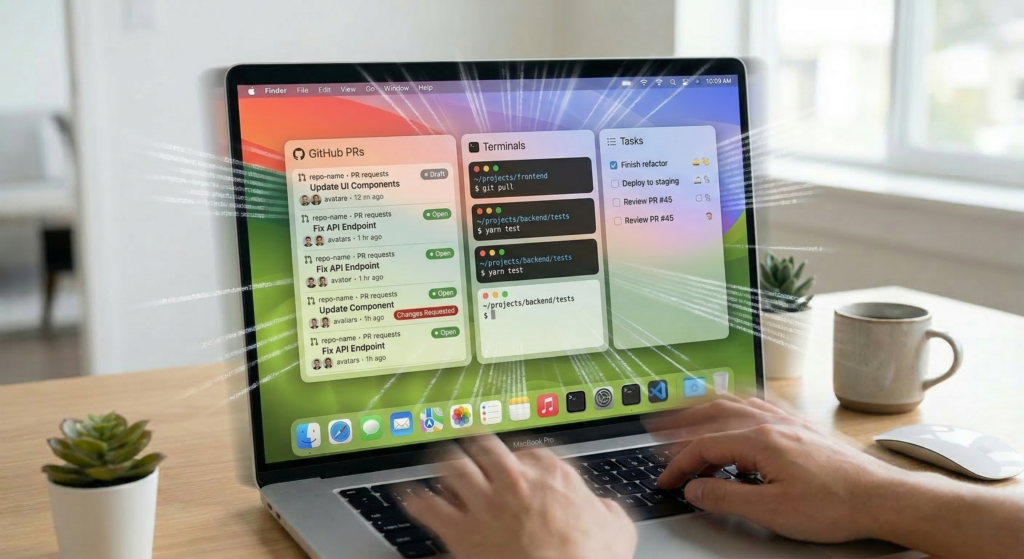
🚀 App & File Launcher
The launcher is the heart of everything. It opens instantly with a keyboard shortcut and lets you type to search, launch, or command anything on your Mac. Apps open before you finish typing. Files appear immediately. Commands execute in milliseconds.
Unlike Spotlight, Raycast doesn’t just search it acts. Every result is actionable. You can open, copy, delete, share, or run commands directly from within the launcher.
🤖 Raycast AI
With a Pro subscription, Raycast embeds a full AI assistant directly into the launcher. Ask questions, generate code, rewrite text, summarize documents all without opening a browser tab. More on this in its own section below.
🧩 Extensions Ecosystem
Raycast has a community-built extensions store with thousands of extensions covering everything from GitHub and Jira to Spotify, 1Password, and Figma. Extensions are built with a flexible API and can be created by anyone. They run natively inside Raycast no browser switching required.
📋 Clipboard Manager
Raycast maintains a full searchable clipboard history. Copy something days or weeks ago? Search it and paste it in seconds. Pro users can extend history to unlimited retention. This alone replaces tools like Paste or Clipboard Manager.
✂️ Snippets (Text Expansion)
Snippets let you create abbreviations that expand into full blocks of text. Type ;;addr and your full address appears. Type ;;sig and your email signature auto-fills. This is the kind of feature that saves hours over weeks of repetitive typing.
🪟 Window Management
Raycast includes a native window management system. Snap windows to halves, thirds, corners, or any custom layout all from keyboard shortcuts. It replaces apps like Magnet or Rectangle with no additional download.
🔗 Quicklinks
Quicklinks let you create shortcuts to any URL, with optional parameters. Build a Quicklink for your Jira board, your GitHub pull requests page, your Notion workspace, or any internal tool open any of them instantly from the launcher.
🛠️ Developer Tools Integration
Raycast integrates natively with developer workflows manage GitHub repos, view open PRs, search Linear issues, trigger CI pipelines, manage Vercel deployments, and more. All without opening a browser.
⚙️ Automation with Script Commands
Custom script commands let you run shell scripts, Python, Node, or Ruby directly from the Raycast launcher. Here’s a simple example of a Raycast script command in bash:
#!/bin/bash

# Required parameters:
# @raycast.schemaVersion 1
# @raycast.title Open Dev Server
# @raycast.mode silent

cd ~/projects/my-app && npm run dev
open http://localhost:3000
Automate repetitive tasks and connect tools the way you want, without needing a separate automation platform. For Indian freelancers juggling multiple client projects, this kind of one-keystroke environment setup is a genuine time-saver.
💡 Key Takeaway: The free tier alone replaces Spotlight (free), Magnet (₹370 one-time), and a basic clipboard manager, giving you three tools’ worth of value at zero cost.
What You Get With Raycast Free ✅ App & file launcher | ✅ 3-month clipboard history | ✅ Built-in window management ✅ Text snippets & expansion | ✅ 1,000+ community extensions | ✅ Calculator, calendar, emoji picker All free. No expiration.
Raycast Review: AI Features Explained
Raycast AI is the Pro-tier feature that turns this mac productivity app into a genuine AI-powered hub and one of the strongest reasons to upgrade after reading this Raycast review. It draws on multiple LLM providers including OpenAI (GPT-4), Anthropic (Claude), Google (Gemini), Perplexity, Groq, Mistral, xAI, and others and surfaces all of them through the same clean Raycast interface.
What You Can Do with Raycast AI
Ask Anything (Quick AI): Hit your Raycast shortcut, type a question, and get an answer immediately no browser, no tab switching. It works like a supercharged search bar that actually understands your question.
AI Chat: A persistent chat interface lives inside Raycast, functioning like a built-in ChatGPT. Useful for longer tasks: writing emails, drafting documentation, debugging logic, or thinking through architecture decisions.
AI Commands: Pre-built and custom AI commands let you process selected text with a single shortcut. Highlight a block of code and run “Explain this code.” Highlight an email draft and run “Make this more concise.” These work across any app on your Mac.
Custom AI Commands: Create your own AI commands for any task you run repeatedly. Set the prompt, set the model, and trigger it with a hotkey.
Model Flexibility: Switch between models depending on the task use a faster, lighter model for quick answers and a more powerful one for complex reasoning. Pro users with the Advanced AI add-on get access to the full roster of frontier models.
Privacy by Design: Raycast does not record inputs or use them to train models. Sensitive data is encrypted locally. AI chat history is only stored if you opt into Cloud Sync, in which case it’s encrypted at rest and in transit.
The result is an AI assistant that’s genuinely faster and more contextual than using ChatGPT in a browser tab, because it’s always one keystroke away and aware of what you’re doing on your Mac.
💡 Key Takeaway: At $8/month (Pro), you’re getting Raycast AI across multiple LLMs plus the full productivity suite meaningfully cheaper than ChatGPT Plus at $20/month for AI alone.
Raycast Review: Extensions Ecosystem Deep Dive
Raycast’s extensions store is one of its biggest differentiators and a key reason this Raycast review scores it so highly as the best spotlight replacement for Mac developers. There are thousands of community-built extensions available, covering virtually every tool a developer or knowledge worker might use.

Popular Extensions by Category
Developer Tools:
- GitHub – Search repos, view PRs, manage issues
- Linear – View and create tickets without opening the app
- Vercel – Trigger deployments and check project status
- Homebrew – Search and install packages from the launcher
- Docker – Manage containers directly from Raycast
Productivity & Project Management:
- Notion – Search pages, create new entries, navigate databases
- Jira – View, create, and update issues
- Asana – Manage tasks without context switching
- Todoist – Add tasks instantly via keyboard
Google Workspace:
- Google Drive – Search and open files instantly
- Gmail – Search emails, compose drafts
- Google Calendar – View upcoming events from the launcher
Design & Creative:
- Figma – Search and open files
- Color Picker – Sample colors anywhere on screen
- Ray.so – Generate beautiful code screenshots
Communication:
- Slack – Search messages, jump to channels
- 1Password – Search and autofill credentials
- Zoom – Start or join meetings
Extensions are built using Raycast’s open API (React-based for UI, Node.js compatible) and can be published to the community store. If an extension doesn’t exist for your tool, you can build it, and the developer documentation is excellent.
💡 Key Takeaway: Unlike Alfred’s Workflows (which require manual configuration), Raycast extensions install in one click and often include dedicated UI panels, a significant UX advantage for developers who want integration depth without setup friction.
Real Productivity Workflows Using Raycast
Developer Workflow
If you’re a developer, this Raycast review section will resonate most. A typical developer morning with Raycast: open your terminal with a hotkey, use the GitHub extension to pull up your open PRs, check Linear for today’s sprint tickets, copy a code snippet from clipboard history, search your local files without Finder, and run a custom script to spin up your dev environment, all before your coffee finishes brewing. No mouse required.
Content Creator Workflow
Writers and content teams use Raycast to maintain snippet libraries of common phrases, templates, and CTAs. The AI assistant drafts outlines, rewrites paragraphs, and translates content. Quicklinks jump directly to CMS dashboards, analytics pages, and shared docs. The clipboard manager stores recently used media URLs.
Startup Founder Workflow
Founders use Raycast to navigate between tools at speed, Notion for strategy docs, Linear for engineering tickets, Slack channels for team comms, and a calendar extension for daily schedule checks. AI commands handle drafting investor updates, writing job descriptions, and summarizing meeting notes from a selected block of text.
Automation Workflow
Power users build custom script commands for things like: resizing and renaming batches of images, querying internal APIs, running test suites, reformatting data between formats, and connecting apps that don’t have native integrations. Raycast becomes a lightweight automation layer on top of macOS.
Raycast Review for Indian Freelancers
For freelancers based in India managing multiple international clients, this Raycast review finding is especially relevant: Raycast’s workflow value is particularly high for multi-client setups. A few India-specific use cases worth noting:
- Multi-client switching: Use Quicklinks to jump between separate Notion workspaces, Trello boards, or ClickUp projects for each client, no tab chaos.
- Time zone snippets: Create a snippet that auto-inserts your working hours in IST alongside a client’s local time for quick scheduling messages.
- Invoice & proposal templates: Store your standard Zoho Books or Canva invoice links as Quicklinks, and keep proposal boilerplate in Snippets.
- INR pricing note: Raycast Pro costs approximately ₹670/month at current exchange rates (billed annually at $8/month USD). The student discount (50% off) is available with a valid university email ID, including Indian institutions.
💡 Key Takeaway: Whether you’re in Madurai, Bengaluru, or Mumbai, Raycast removes the friction of constant context-switching, a real competitive edge when you’re managing three client projects simultaneously.
💡 Ready to cut your context-switching in half? Raycast is free to download and takes 2 minutes to set up. Get Raycast Free → | Need a custom workflow for your SaaS? Let’s talk →
Raycast Pricing: Is It Worth It?
One of the most common questions after reading a Raycast review is about cost. Raycast uses a freemium model, and the free tier is genuinely impressive.
| Plan | Price (USD) | Price (INR approx.) | What’s Included |
|---|---|---|---|
| Free | $0 / forever | ₹0 | Launcher, clipboard history (3 months), window management, snippets, file search, quicklinks, full extensions access |
| Pro | $8/month (annual) or $10/month | ~₹670–₹840/month | Everything in Free + Raycast AI, Cloud Sync, custom themes, unlimited clipboard history |
| Advanced AI Add-on | Additional on top of Pro | Additional on INR Pro cost | Frontier models (GPT-4, Claude Opus, Gemini Ultra, etc.) |
| Team | Custom per-user | Custom | All Pro features + shared extensions, snippets, quicklinks across organisation |
Student Discount: Verified students (including Indian university email IDs) get 50% off Pro.
BYOK (Bring Your Own Key): Pro users can connect their own API keys for OpenAI, Anthropic, and Google, direct model access with no per-message limits.
The free tier has enough functionality to replace Spotlight, Magnet, and a basic clipboard manager, three tools some people pay for separately. The Pro tier at $8/month billed annually is competitively priced against paying for ChatGPT Plus ($20/month) when you factor in the full AI access bundled with everything else.
Raycast Review: Pros and Cons
| ✅ Pros | ❌ Cons |
|---|---|
| Free tier is genuinely feature-rich | macOS only (Windows is in beta) |
| Fastest keyboard launcher available on Mac | Learning curve for non-keyboard users |
| Deep native integrations with dev tools | AI features require paid Pro plan |
| Thousands of community extensions | Advanced AI models cost extra on top of Pro |
| Built-in AI across multiple LLMs | No Android mobile app |
| Replaces multiple paid apps (Magnet, Clipboard apps) | Can feel overwhelming at first |
| Strong privacy, local data storage | Extensions quality varies |
| Active and responsive developer team | Some niche tools may not have extensions yet |
| Supports BYOK for AI models (OpenAI, Claude, Gemini) | |
| Beautiful, modern UI | |
| Student discount (50% off, incl. Indian universities) |
Raycast Review vs Competitors: Alfred, Spotlight & LaunchBar
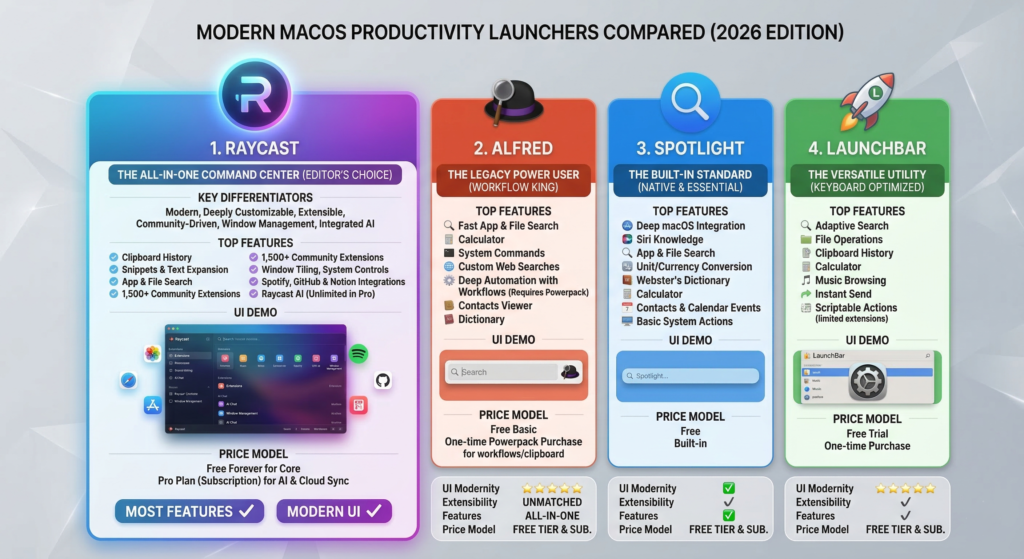
Raycast Review vs Alfred
In this Raycast review, Alfred is the most important comparison. Alfred is Raycast’s most discussed competitor and has been the gold standard Mac launcher since 2010. Alfred uses a one-time “Powerpack” purchase (~$35 / ~₹2,900 one-time) rather than a subscription, which some users strongly prefer.
However, Raycast offers a notably more modern interface, deeper native integrations with modern dev tools, a significantly larger community extensions library, and built-in AI. Alfred’s Workflows are powerful but require more configuration. Raycast’s extensions are more accessible and easier to install.
Bottom line: Alfred is excellent and its one-time purchase model is appealing. But for developers using tools like GitHub, Linear, and Notion daily, Raycast’s integration depth gives it a real edge. See our Alfred vs Raycast deep-dive → for a full side-by-side breakdown.
Raycast vs Spotlight
Apple’s built-in Spotlight is fast, convenient, and zero-cost. For users who primarily need to launch apps and do quick searches, Spotlight works fine. But it has no extensions, no clipboard manager, no window management, no AI, and no developer tool integrations.
Bottom line: Spotlight is fine for casual users. Raycast is in a completely different league for anyone with professional or technical workflows. As a spotlight replacement for Mac, Raycast wins on every metric that matters to developers.
Raycast vs LaunchBar
LaunchBar (by Objective Development) is a veteran Mac launcher with a loyal fanbase. It’s powerful and highly customizable, but built around a different input model that some find harder to learn. It doesn’t have a community extensions marketplace, and its AI integrations are limited compared to Raycast.
Bottom line: LaunchBar is a great tool with a devoted following, but Raycast is easier to get started with and more extensible for modern workflows.
Quick Comparison Table
| Feature | Raycast | Alfred | Spotlight | LaunchBar |
|---|---|---|---|---|
| Price | Free / $8/mo | Free / ~$35 one-time | Free | ~$29 one-time |
| Extensions store | ✅ (1000+) | ✅ (limited) | ❌ | ❌ |
| AI integration | ✅ | ❌ | ❌ | ❌ |
| Clipboard manager | ✅ | ✅ | ❌ | ✅ |
| Window management | ✅ | ❌ | ❌ | ❌ |
| Cloud sync | ✅ (Pro) | ❌ | ❌ | ❌ |
| Developer tool integrations | ✅ Deep | ✅ Moderate | ❌ | ✅ Moderate |
| Modern UI | ✅ | ⚠️ Dated | ⚠️ Basic | ⚠️ Functional |
| BYOK AI keys | ✅ | ❌ | ❌ | ❌ |
Who Should Use Raycast? (Raycast Review Verdict by User Type)
Developers and Engineers – If you work with GitHub, Linear, Jira, Vercel, or any modern dev stack, Raycast’s extensions ecosystem will cut your context-switching in half. The custom script commands and API access make it a lightweight automation tool too. For more tools in this category, see our Best Developer Tools for Mac → roundup.
Startup Founders and Product Managers – Managing many tools simultaneously? Raycast’s Quicklinks, snippets, and AI commands make navigating your tool stack fast and consistent.
Mac Power Users – Anyone who values keyboard efficiency over mouse navigation will find Raycast genuinely transformative. The combination of launcher + clipboard + window manager + snippets in one app is a major consolidation.
Content Creators and Writers – Snippet libraries, AI writing assistance, and Quicklinks to CMS and analytics dashboards make Raycast a strong daily driver for content-heavy roles.
Indian Freelancers, Based on this Raycast review, if you’re managing multiple clients across time zones with tools like Notion, Trello, Zoho, and Slack, Raycast’s Quicklinks and snippets create the kind of structured, fast navigation your workflow needs. The free tier alone is a strong enough reason to switch from Spotlight. For more on AI-powered tools for freelancers, see our Best AI Tools for Indian Developers → guide.
Teams, The Team plan allows shared extensions, snippets, and quicklinks across an organisation, useful for standardising workflows and onboarding new hires faster.
Raycast is less suited for Linux users (no native support), Windows users (beta only), or users who prefer mouse-driven workflows over keyboard-first navigation.
Is Raycast Worth It? Final Verdict
To wrap up this Raycast review: for Mac users with any kind of professional or technical workflow, Raycast is one of the highest-leverage tools available. The free version alone replaces Spotlight, Magnet, and a clipboard manager , three tools with a combined cost of ₹0–₹2,500+ depending on what you’re using. That free tier is available forever with no feature expiration.
The Pro tier at $8/month (billed annually, ~₹670/month) adds full AI access across multiple LLMs, cloud sync, and unlimited clipboard history. Compared to paying for ChatGPT Plus at $20/month, you’re getting AI assistance plus a complete Mac productivity suite at a significantly lower cost.
The strongest signal of Raycast’s value is behaviour: users who install it tend to keep it. It’s one of those rare tools where the upgrade from “never heard of it” to “I install this first on every new machine” happens within days. After 8 months of daily use, this Raycast review verdict is clear , it’s the best Mac launcher available in 2026.
If you’re a developer, founder, or Mac power user , try it today. It’s free to start, takes minutes to set up, and you’ll wonder how you worked without it.
🚀 Start Using Raycast Today Free forever. Pro from $8/month (~₹670/month) billed annually. Used by developers at top startups worldwide.
👉 Download Raycast Free → | 👉 View Pro Features →
💼 Building a SaaS or need a custom Mac workflow for your dev team? Book a free consultation → | View my portfolio →
Frequently Asked Questions: Raycast Review 2026
Is Raycast free to use?
Yes, and it’s one of the strongest points in this Raycast review. Raycast’s free tier is permanent and includes the launcher, clipboard manager (3-month history), window management, snippets, and full access to 1,000+ extensions. No credit card required, no expiration date.
Does Raycast work on Windows?
Raycast is primarily a macOS app. A Windows version is currently in beta as of 2026, but full feature parity with the Mac version is not yet available.
Is Raycast better than Alfred?
Short answer from this Raycast review: yes, for most developers. Raycast’s native integrations and AI features give it a meaningful edge over Alfred for those using GitHub, Linear, and Notion. Alfred’s one-time Powerpack purchase (~$35) may appeal to users who prefer no subscriptions. See our Alfred vs Raycast comparison → for a detailed breakdown.
How much does Raycast Pro cost in India?
Raycast Pro is priced at $8/month billed annually, which is approximately ₹670/month at current exchange rates. Month-to-month billing is $10/month (~₹840/month). A 50% student discount is available for verified students, including those with Indian university email IDs.
Can I use my own OpenAI or Claude API key in Raycast?
Yes. Raycast Pro supports BYOK (Bring Your Own Key) for OpenAI, Anthropic Claude, and Google Gemini, giving you direct model access without per-message limits. This is especially useful for power users who already pay for API access.
What is the best Raycast extension for developers?
The GitHub extension is the most universally useful for developers, it surfaces your PRs, issues, and repos directly inside the launcher. The Linear, Vercel, and Homebrew extensions are close runners-up for anyone on a modern dev stack.
Does Raycast replace Alfred completely?
For most developers, yes this Raycast review gives it the edge. Raycast’s free tier covers everything Alfred’s free tier does, and the Pro tier adds AI features Alfred doesn’t offer at all. The main reason to stay on Alfred is the one-time purchase preference there’s no subscription required.
Is Raycast good for Indian freelancers?
Yes, and this is one of the most underrated findings in this Raycast review. Raycast’s free tier alone replaces several paid Mac apps, making it cost-effective at ₹0/month. The Pro plan at ~₹670/month is cheaper than most productivity app bundles. The INR pricing, 50% student discount for Indian university email IDs, and multi-client Quicklinks workflow make it particularly well-suited for freelancers across India, whether you’re in Madurai, Bengaluru, or Pune.
2 thoughts on “Raycast Review 2026: The Honest Truth About the Best Mac Launcher”